Skip to content
BETAThe lab is free and in beta. Found something wrong?

AI Basics lab

An AI basics lab where you learn what AI is by playing with it

Learn what AI is by playing with it: teach a camera, watch a model learn, test it and check it is fair.

0 of 11 levels done

  • Free
  • About 3 hours
  • Foundation to Advanced
  • No ratings yet

Free to open. Your work is saved on this device; a free account keeps it everywhere. The lab is in beta.

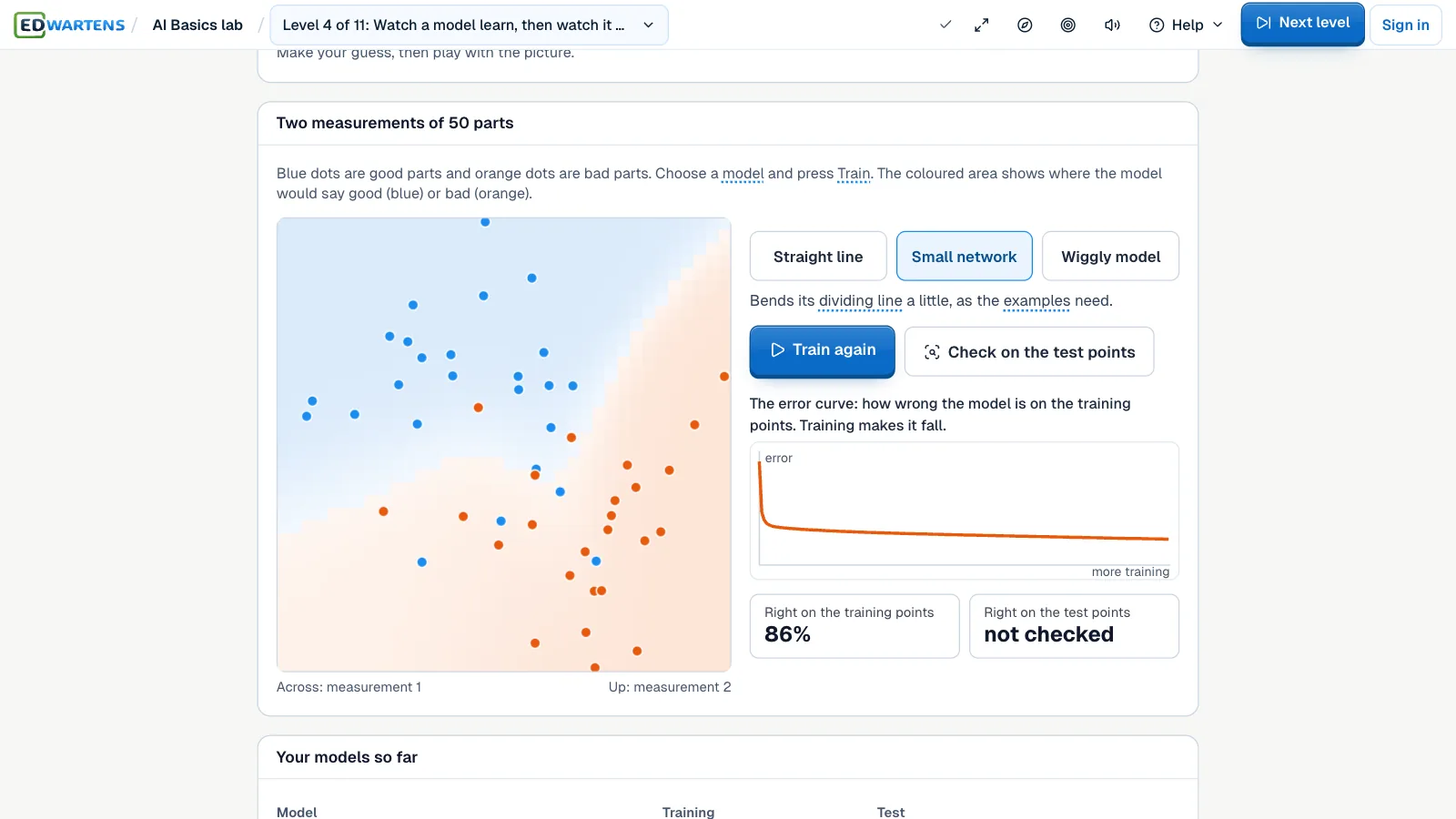
The AI Basics lab: a small model learning to tell good parts from bad ones, with its error curve and its score

11 levels

Levels in the AI Basics lab

Start at the top, or open any level you like. Tap a title to read about it.

  1. Start What is AI? Rules or learning from examples
  2. Start Teach a camera to spot a dented part
  3. Start Data and labels: what we see and what we want to say
  4. Start Watch a model learn, then watch it memorise
  5. Start Is it any good? Catches, false alarms and the threshold
  6. Start Is it fair? Check a CV screen for a hidden proxy
  7. Start Words become numbers: tokens and a meaning map
  8. Start How a chatbot picks its next word
  9. Start Answer from a manual: retrieval with sources
  10. Start An AI agent at work: tools and guardrails
  11. Start Ship it and watch it: drift and a model card

Ratings and reviews

What learners say

Ratings come from learners who saved work in this lab.

Ratings and reviews

No ratings yet. Save work in a level, then be the first to rate this lab.

About the AI Basics lab

Teach the camera. Check it is fair.

The AI Basics lab in EDWartens Lab explains AI with pictures you play with, not with lectures. You teach a camera to spot a dented part, watch a model learn, cut a sentence into tokens, answer questions from a manual and stop an agent from placing an unsafe order. It is free in your browser, with no maths and no code.

No maths and no code. Every level is a picture you play with: a camera that learns from your photos, a map where similar words sit close, a bot that answers only from a manual, an agent with a guardrail. Small real models run in your browser.

  • Teach a camera with photos of dented and good parts, then test it on photos it has never seen
  • Watch a model learn, then watch it memorise, and see why 99 percent can mean nothing
  • Cut a sentence into tokens and place support tickets on a map of meaning
  • Answer from a pump manual with sources, and stop an agent from placing an unsafe order

Tools in this lab

  • Teach a camera with photos of good and dented parts
  • Words as numbers, a chatbot's next word, answers from a manual
  • Check a model is good, fair and still working

The guide

What to know before you start

Short answers first. Open a card for the rest.

What the AI basics lab does

Every level starts with a one-line brief from a fictional company and a Predict first question: you guess, then you see. Then you play with a picture, finish a short task and read one sentence on how the idea is used at work. Each term, such as model, label, threshold, token or embedding, has a short plain meaning you can tap.

Read more

Where something is real, the level says so. Small open models run in your browser after you tap Start, and the level says plainly what is real and what is made up.

Eleven levels, from rules to drift

The first levels ask what AI is, how data and labels work, how a model learns and why a model that scores 100 percent on its own examples can still fail. Then you check whether a model is any good and whether it is fair. The later levels teach a camera with photos of good and dented parts, cut words into tokens, place support tickets on a map of meaning, watch a chatbot choose its next word, answer from a pump manual with sources, and give an agent tools and a guardrail.

Read more

The last level watches the camera model after eight weeks: find the week it went wrong, name the cause and fill in a model card.

Private by design

The models and their files are served from this site, so nothing is fetched from a third party while you play. The webcam in the camera level is optional, asks first, and nothing leaves your browser. The companies, parts and people are made up.

Free, and the way into the AI Workbench

Opening the lab and doing the levels is free, and you can start without an account. A free EDWartens account records your results. When you finish, the AI Workbench is the next lab: the same ideas on real tables of data.

How it works

  1. Open Teach a camera and make your Predict first guess.
  2. Add photos of good and dented parts and press Train.
  3. Try Watch a model learn and Is it any good.
  4. Check a CV screen for fairness.
  5. Continue in the AI Workbench.

Questions

Questions people ask.

Do I need to know maths or code?

No. Every level is a picture you play with, and every term has a short plain meaning. The ideas carry over to code-based tools later.

Do the models really run in my browser?

Yes. Small open models are downloaded once from this site after you tap Start and run in your browser. The level tells you the size before you tap. Nothing you type or show the camera is sent anywhere.

Is the webcam needed?

No. The camera level comes with a set of photos of good and dented parts. The webcam is optional, asks your permission first and stops when you leave the level.

Is it a paid AI service?

No. Nothing in the lab is a paid AI call, so you can repeat any level as often as you like.

Keep exploring

Other labs and guides

Updated 1 Nov 2026.

Other labs

  • AI WorkbenchPrepare data, train a model and check the AI's work against a brief.
  • AI Data Centre labWalk an AI data hall, rack and cable a GPU server, and size its power and cooling.
  • PLC labProgram a working machine in ladder, Structured Text or SFC and watch it run.
  • Electrical labLock out, wire, test and fault-find a control panel, then prove it with a factory acceptance test.
  • Robotics labTeach a robot arm a pick and place job and prove its handshake with the PLC.
  • Process labRead the P&ID, check and calibrate instruments, tune loops and run a plant from a control room.
  • Maintenance labKeep a small plant running: find faults with real instruments, fix them safely and record the work in a CMMS.
  • Substation and MCC labWalk a small substation, isolate a motor bucket safely, grade a relay and fault-find a motor control centre.
  • Solar and EV labSize a solar array, set a battery and fault-find an EV charger on a commercial site.
  • OT security labMap a plant network, split it into zones, write the firewall rules, read the logs and run the response drill.

Start the AI Basics lab now.

Free, in your browser, with nothing to install.