

19 PLC exercises · free
PLC programming exercises you can run in your browser
19 PLC programming exercises, in order from your first seal-in circuit to a fault-finding challenge. Each one is a small job for a fictional client: read the brief and the I/O list, write the program in ladder logic, Structured Text or SFC, run it on a simulated machine, and pass the factory acceptance test that marks it.
- 19 exercises
- About 20 hours 5 minutes in all
- Foundation to Intermediate
- Free · nothing to install
- Updated 24 Oct 2026
Free. You can start without an account, and your work is saved on this device. The lab is in beta.
The 19 exercises, in order
Do them in order: each one adds an idea to the last. The difficulty, the time and the skills come from each exercise's own task.
- Start Motor start/stop with overload
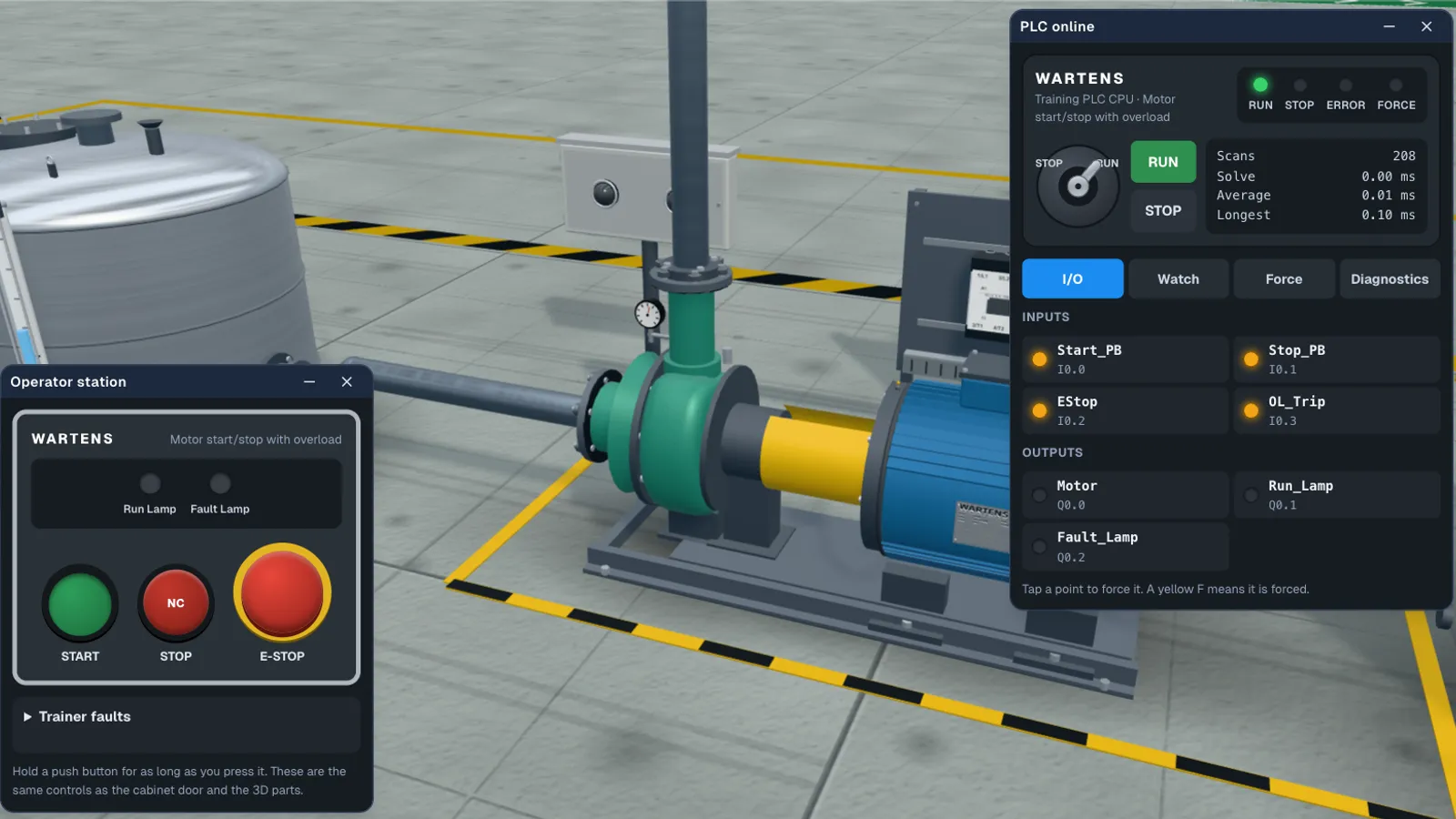
Exercise 1: Motor start/stop with overload
Brief: Start, seal-in, stop, E-stop and an overload that trips. The first thing every PLC programmer builds.
Teaches: Seal-in circuits, Normally closed safety inputs, Fail-safe stop logic, Indicator lamps.
- Start Forward/reverse conveyor
Exercise 2: Forward/reverse conveyor
Brief: Two contactors that must never close together, and a dead time before the motor may reverse.
Teaches: Electrical and software interlocks, TON timers, Seal-in circuits, Reversing starters.
- Start Star-delta fan starter
Exercise 3: Star-delta fan starter
Star-delta PLC program
Brief: Start in star, change over to delta through a dead gap, and watch the starting current.
Teaches: Timer sequencing, Contactor interlocks, Motor starting methods, Reading a timing diagram.
- Start Batch counter on a packing line
Exercise 4: Batch counter on a packing line
Conveyor box counter PLC program
Brief: Count boxes past a photo-eye once each, stop at the batch size, and survive a backed-up line.
Teaches: CTU counters, Rising-edge detection, Counter reset, Seal-in circuits.
- Start Tank filling pump
Exercise 5: Tank filling pump
Tank level PLC program
Brief: Fill between two floats, protect the pump from running dry, and latch a high-high alarm.
Teaches: Latch and unlatch (OTL/OTU), Level control with hysteresis, Dry-run protection, Latched alarms and acknowledgement.
- Start Pedestrian crossing
Exercise 6: Pedestrian crossing
Traffic light PLC program
Brief: A timed sequence with a push button, where one wrong light puts somebody in danger.
Teaches: Sequential control with timers, One-shot (ONS) edge detection, Safety interlocking of outputs, State thinking.
- Start Parcel sorter
Exercise 7: Parcel sorter
Brief: Read the lane at the beam, wait for the parcel to travel, and fire the pusher at the right moment.
Teaches: Edge-triggered sampling, Timer chains, Tracking a part along a conveyor, Clearing state on stop.
- Start Duty and standby pumps
Exercise 8: Duty and standby pumps
Brief: Share the work between two pumps and take over within seconds when one trips.
Teaches: Duty/standby alternation, Edge detection, Fault takeover logic, Pump protection.
- Start Scale the tank level
Exercise 9: Scale the tank level
Tank level PLC program with 4-20 mA scaling
Brief: Turn raw 4-20 mA counts into a level, pick set points from a recipe, run the pump, and tell a broken wire from an empty tank.
Teaches: Analog scaling (integer maths), Compare and MOVE, Level control with hysteresis, Alarms with a dead band, Signal fault (live zero) handling.
- Start Conveyor jam detection
Exercise 10: Conveyor jam detection
Brief: Three belts in a row. Start them in order, spot a jam with a timer, stop the jammed belt and the ones feeding it, and never restart by itself.
Teaches: Sequenced starts with timers, Jam detection with a timer, Latching faults and resets, Upstream and downstream interlocks, Restart prevention.
- Start Reusable motor block: four motors
Exercise 11: Reusable motor block: four motors
Brief: Write one motor routine with a seal-in, an overload and a contactor feedback check, then copy it for four fans that never disturb each other.
Teaches: Reusable logic patterns, Seal-in with permissives, Contactor feedback monitoring, Fault latch and reset conditions, Independent copies.
- Start Filling sequence
Exercise 12: Filling sequence
Brief: Fill, settle and discharge a vessel in order with a step number, run the valves by hand within their limits, and stop a fill that takes too long.
Teaches: State machine with a step number, Rising-edge start, Timers per step, Manual mode with limits, Fill timeout fault with latched reset.
- Start Packaging line drive
Exercise 13: Packaging line drive
Brief: Run a variable-speed belt drive: a speed set point from the pot between two limits, drive faults, a stall check and an at-speed lamp.
Teaches: Analog set points (integer maths), Limits and clamping, Drive interfacing: run, ready, fault, feedback, Stall detection with a timer, Latching faults and resets.
- Start Safety gate interlock
Exercise 14: Safety gate interlock
Brief: A guarded press that stops the moment its gate opens and never restarts by itself: a fresh Reset, then a fresh Start. Standard logic practice, not a safety function.
Teaches: Guard interlock logic, Fresh-press (one-shot) reset, Latching and unlatching a trip, Normally closed safety inputs, Restart prevention.
- Start Air handling unit temperature control
Exercise 15: Air handling unit temperature control
Brief: Hold the supply air near a set point with a proportional heating valve and a dead band, prove the airflow first, and protect the coil from frost.
Teaches: Proportional control with SUB, MUL and DIV, Dead band, Airflow proving with a timer, Frost protection latch, Set point selection.
- Start Palletiser sequence
Exercise 16: Palletiser sequence
Brief: Count cartons into layers, push each layer onto the pallet, lower the pallet one step, and stop with a lamp when the pallet is full.
Teaches: Step sequencing, Counting with a one-shot, Timed output (pallet lowering), Interlocking movements, Limit-switch feedback.
- Start Batch mixer with recipes
Exercise 17: Batch mixer with recipes
Brief: Pick a recipe with two selector bits, then fill, mix and discharge a tank to that recipe, with the recipe locked and a hardwired high-high abort.
Teaches: Recipe selection with ADD, MOVE into a timer preset, Locking a value at the start of a batch, Step sequencing, Hardwired high-high abort.
- Start Bottling line: fill, cap, reject
Exercise 18: Bottling line: fill, cap, reject
Brief: Stop each bottle at the filler, fill it for a set time, check it has a cap, reject the ones that do not, and stop the line when the batch is done.
Teaches: Sequence with timers, One-shot counting, Delayed reject output, Batch counting and reset, Sensor and presence interlock.
- Start Fault-finding challenge
Exercise 19: Fault-finding challenge
Brief: A colleague's pump program is already loaded. It runs, it looks right, and it fails six tests. Find the faults and fix them.
Teaches: Reading and tracing ladder logic, Normally closed input wiring, Seal-in and latch/unlatch faults, Timer presets and units, Compare instructions, Fault-finding method.
How the marking works
Every exercise ends in a factory acceptance test (FAT), the same kind of check a client runs before a machine leaves the workshop. It is a numbered list of tests that runs automatically against your program and the simulated plant, and you can read the FAT protocol before you start, so you know what will be checked.
The numbers in each brief, such as timer presets, batch sizes and level set points, are drawn per learner. That stops a program that only fits one answer, and it means a copied program usually fails.
A failed test names the behaviour that is wrong, not the fix. There is no answer key in the lab: you watch the rungs and the plant, change the program and run the test again. When every test passes you can download the FAT report as a PDF, and a free account records the pass.
Each exercise's acceptance test runs 4 to 7 numbered tests.
A free alternative to Factory I/O, in your browser
Factory I/O is a well-made 3D factory simulator for PLC training, with more than 20 industrial scenes. It runs on Windows and has a free 30-day trial of the full Ultimate Edition. After that it is paid: from €40 a year for the Starter Edition to €278 a year for the Ultimate Edition, or a one-time payment from €109 (prices on factoryio.com, checked 24 October 2026). Most editions are made to be driven by a PLC or software PLC you already have; the Starter Edition has a built-in PLC simulator.
EDWartens Lab is free with no time limit, runs in a browser on Windows, Mac, Linux or a phone, and has its own PLC built in, so there is nothing else to buy or install. Each exercise also comes with a client brief, an I/O list and a marked acceptance test, which Factory I/O leaves to you or your trainer.
Factory I/O is the better choice when you want to drive a virtual plant from a real Siemens or Allen-Bradley PLC, or from the vendor's own software. The lab runs its own PLC engine and does not connect to real hardware.
What to do next
- Use the exercises in a job. The free PLC Programmer job simulation puts you on a simulated bottling line, and on day 5 it sends you to the batch counter and tank pump exercises: PLC Programmer job simulation (UK) or on edwartens.com.
- Learn ladder logic first. The free ladder logic course gives the order to learn it in, and these exercises are where you practise it.
- See the whole lab. The PLC lab page has the tools, ratings and videos; the ladder logic simulator guide explains the editor.
- Teach a class. The virtual PLC lab for colleges lets a trainer assign exercises with due dates.
Job simulations are training, not employment.
Questions people ask
Do I need to install anything?
No. The exercises run in a web browser, with the lab's own PLC engine and editor. There is no download, no licence key and no PLC to buy. Once the lab has loaded it also keeps working offline.
Are the answers given?
No. There is no answer key. The FAT protocol tells you what each test checks, and a failed test names the behaviour that is wrong, so you work out the fix yourself. The numbers in each brief are drawn per learner, so a program copied from someone else usually fails.
Which PLC language do the exercises use?
Your choice of ladder logic, Structured Text or Sequential Function Chart, the IEC 61131-3 languages. The same acceptance test judges whichever you use. The lab has Siemens-style addressing, and it can also show a Siemens-style or a Rockwell-style view; the ideas carry over to any brand.
Are these PLC exercises good for beginners?
Yes. The first 5 are Foundation level and start with a motor start/stop circuit, the first program every PLC programmer writes. The rest add timers, sequences, analog signals and fault finding one idea at a time. Do them in order.
How long do the exercises take?
Each one takes about 45 to 80 minutes, about 20 hours 5 minutes for all 19. Your work is saved as you go, so you can stop and come back.
Does it work on a phone?
Yes, every exercise opens in a phone browser. Writing ladder is easier on a laptop, which also gives the best view of the 3D plant.
Can my college or training centre use these exercises?
Yes. Trainers can assign the exercises to a class with due dates and see who has passed. Students use the lab free in a browser, so no trainer kits or licences are needed for this practice.
Is it really free?
Yes. Opening the exercises, programming them and passing the acceptance tests are free, and you can start without an account. A free EDWartens account records your passes on every device. Only optional extras, such as an engineer's review of your FAT report, are paid. The lab is in beta.