Process lab
PID tuning, 4-20 mA loop and calibration simulator for your browser
Process control is learned by tuning a real-looking loop and finding a real-looking fault. The Process lab in EDWartens Lab gives you a water skid with a control room behind it, free in your browser. Read the drawing, check the loop, calibrate the transmitter, tune the controller and run the plant.
Open the lab freeSee the whole lab
Free with a free EDWartens account. Runs in your browser. The lab is in beta.
What the process control simulator does
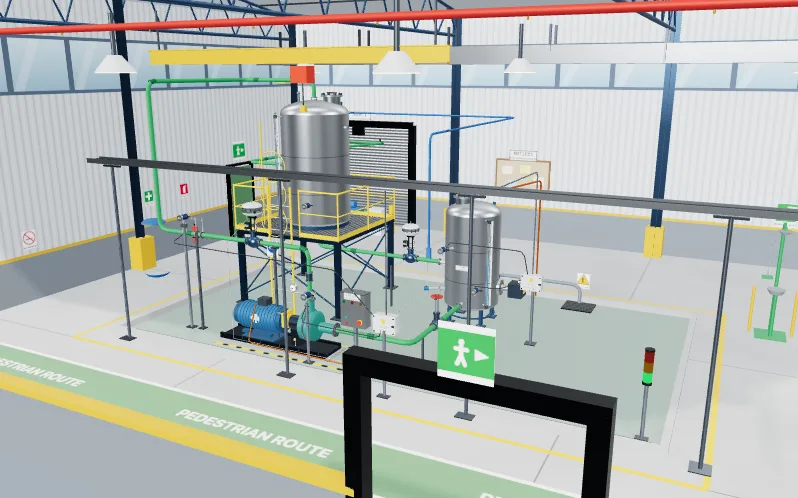
Each job is a work order on a fictional site. You work on one skid with a level loop, a flow loop with a control valve, a pressure transmitter and a control room. The tools behave like the real ones: a loop-powered signal that reads 4 to 20 mA, a calibration bench with a reference, a step test you run on the tank, and trends that move as the process moves.
The Process lab sits beside the PLC and Panel labs. It uses the same work orders, the same 3D style and the same automatic acceptance test, so process work and electrical work practise together.
Eight jobs on one skid
The lab has eight levels. You read the P&ID of the skid and click the right instrument every time. You loop check a 4 to 20 mA level loop from the field to the PLC, find the wiring fault with a meter and fill in the loop check sheet. You calibrate a pressure transmitter with a five-point as-found run, adjust zero and span, prove it as-left and issue the certificate.
Then you tune the level loop and a fast flow loop, stroke-test a control valve and set the controller action to match its fail position, rationalise the alarms of twelve tags, build an operator overview screen, and finish with a site acceptance test and fault finding on the finished skid.
How PID tuning is practised
In the tuning levels you run a step test on the process, read the response and choose the proportional, integral and derivative values. The test then judges your choice against limits for overshoot and settling time, and it checks that the valve is not chattering. Direct and reverse action matter here: the wrong one drives the loop away from its set point.
Level control is an integrating process and flow is a fast one, so the two loops need different thinking. The lab lets you meet both.
Free, and part of the instrumentation internship
Opening the lab, doing the levels and passing the acceptance tests are free with a free EDWartens account. The lab is in beta. Process lab tasks also count inside the Instrumentation and Process Control internship, and the Commissioning and Maintenance, SCADA and HMI and PLC Programming internships, on edwartens.com. The first 4 weeks of an internship are free, and continuing past 4 weeks is paid. An internship is training, not employment, and there is no stipend.
How it works
- Create a free EDWartens account, or sign in if you already have one.
- Open Read the P&ID and match each tag to its instrument.
- Loop check the level transmitter and fix the wiring fault.
- Calibrate the pressure transmitter and tune the level loop.
- Set the alarms, build the operator screen and pass the site acceptance test.
Labs to open for this
- Read the P&IDProcess lab
- Loop checkProcess lab
- Calibrate a pressure transmitterProcess lab
- Tune the level loopProcess lab
Browse all labs (free account needed to open them).
Questions people ask
Is there a free PID tuning simulator?
Yes. The Process lab in EDWartens Lab has levels where you run a step test on a tank level loop and a flow loop, choose PID values and meet overshoot and settling limits. It is free with a free EDWartens account and runs in your browser.
Can I practise 4-20 mA loop checks and calibration online?
Yes. One level has you check a 4 to 20 mA level loop from the field to the PLC, find a wiring fault with a meter and fill in the loop check sheet. Another has you calibrate a pressure transmitter as found and as left and issue a certificate.
Do I need a PLC or any software to install?
No. The Process lab runs in a web browser with its own engine. There is nothing to install and no hardware to buy.
What is the difference between direct and reverse action?
Direct action raises the controller output when the measurement rises. Reverse action lowers it. Which one is right depends on the valve and the process, which is why the lab has you check the valve's fail position and set the action to match.
Six labs in one place
- PLC labProgram a working machine in ladder, Structured Text or SFC and watch it run.
- Panel LabLock out, wire, test and fault-find a control panel, then prove it with a factory acceptance test.
- Robotics labTeach a robot arm a pick and place job and prove its handshake with the PLC.
- Process labRead the P&ID, check and calibrate instruments, tune loops and run a plant from a control room.
- AI WorkbenchPrepare data, train a model and check the AI's work against a brief.
- AI Data CentreWalk an AI data hall, rack and cable a GPU server, and size its power and cooling.
Related guides
- Free online PLC simulator
- Multimeter and fault-finding simulator
- Virtual PLC lab for colleges and trainers
- EDWartens Lab: six free engineering and AI labs