Skip to content
BETAThe lab is free and in beta. Found something wrong?

AI Workbench

A machine learning lab where you train and test models in your browser

Prepare data, train a model and check the AI's work against a brief.

0 of 27 levels done

  • Free
  • About 12 hours
  • Foundation to Advanced
  • 93 learners

Free to open. Your work is saved on this device; a free account keeps it everywhere. The lab is in beta.

27 levels

Levels in the AI Workbench

Start at the top, or open any level you like. Tap a title to read about it.

Start with data

Levels 1 to 2
  1. Start Data health check
  2. Start The downtime report: clean the export, answer in SQL

Train and test a model

Levels 3 to 6
  1. Start Train and evaluate without leakage
  2. Start Choose the metric and the threshold
  3. Start Overfitting: tune the tree
  4. Start Feature work and the model bake-off

Vision

Levels 7 to 8
  1. Start Vision inspection on the conveyor
  2. Start Teach a vision model on real-looking parts

Language and agents

Levels 9 to 15
  1. Start Prompt to spec
  2. Start Answers with sources
  3. Start Build an evaluation set
  4. Start Evaluate the retriever
  5. Start Cost, speed and quality
  6. Start A safe agent
  7. Start Test an agent and try to break it

Responsible AI

Levels 16 to 18
  1. Start Fairness check
  2. Start Privacy first
  3. Start Risk score: calibration and subgroups

Check an AI's writing

Levels 19 to 21
  1. Start Check the AI's work: finance
  2. Start Check the AI's work: HR
  3. Start Check the AI's work: marketing

Build a model, then check the note

Levels 22 to 23
  1. Start No-show model and a safe AI note
  2. Start Delay-risk model and a schedule check

Forecast and group

Levels 24 to 25
  1. Start Forecast the demand
  2. Start Find the segments

Run it and review it

Levels 26 to 27
  1. Start Monitor it and spot the drift
  2. Start Go or no-go review

Walkthrough

Watch the full walkthrough

Voiced, with chapters. It loads when you press play.

AI Workbench walkthrough: train and check a model. Playing this video loads YouTube.

Equipment in this lab

Equipment in the AI Workbench

18 real things to look at. 4 open up to show what is behind the cover, and 2 pull apart piece by piece.

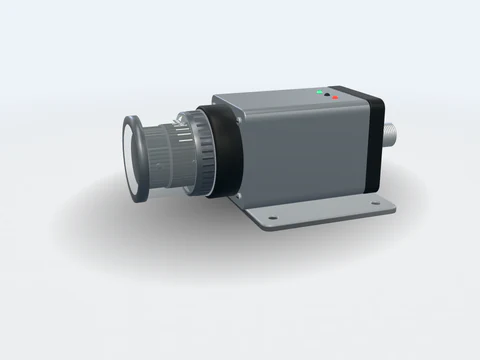
  • Smart camera (machine vision) in the AI Workbench, shown in 3DSmart camera (machine vision)A camera with its own small computer, used to check parts on a line.Opens
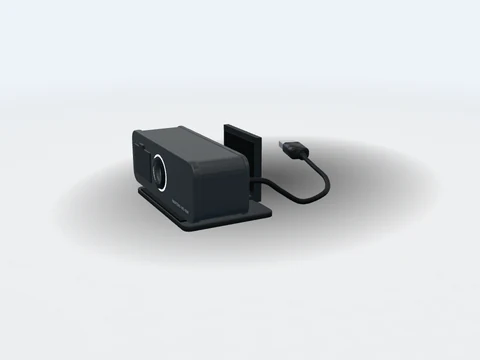
  • USB webcam in the AI Workbench, shown in 3DUSB webcamA small camera on a cable that sends live video to the laptop.OpensPulls apart
  • GPU card in the AI Workbench, shown in 3DGPU cardA card with a chip that does huge numbers of sums at once, used to train AI models.OpensPulls apart
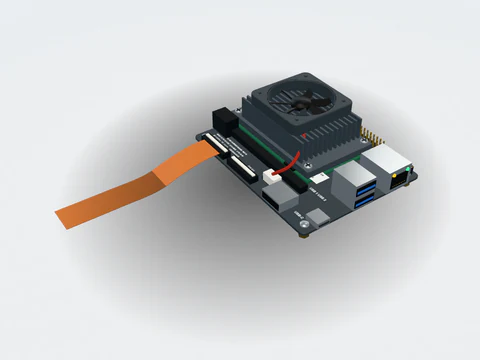
  • Edge AI module with carrier board in the AI Workbench, shown in 3DEdge AI module with carrier boardA small low-power computer that runs an AI model next to the camera.Opens

and 14 more in the library.

Open the lab with its equipment library

Ratings and reviews

What learners say

Ratings come from learners who saved work in this lab.

Ratings and reviews

3.7
3 ratings
51
41
30
21
10
  • Excelent

    Excelent

    Eduardo F. · Passed 4 levels · 7 Nov 2026
    EDWartens team

    Thank you, Eduardo, that is kind of you. Passing four levels of the AI Workbench, Fairness check among them, shows real care with data. We hope the rest of the workbench is just as useful to you.

  • Is'haq A. · Worked on 1 level · 29 Oct 2026
    EDWartens team

    Thanks, Is'haq. Prompt to spec is about turning a loose request into something a team can build and test, so it is a sensible place to begin the AI Workbench.

  • Vedika P. · Worked on 3 levels · 29 Oct 2026
    EDWartens team

    Thank you for the honest rating, Vedika. If Privacy first fell short, we would like to know where: the ticket export, the checks or the wording. Use Report a bug in the lab and we will look at that level.

Sign in free and save work in a level to add your own rating.

About the AI Workbench

Train it. Test it. Check it.

The AI Workbench in EDWartens Lab is a practice lab for machine learning and applied AI. You clean a table, train a model without letting the answer leak, run a vision inspection, write prompts, and check what an AI produced against a brief. It is free in your browser.

Work on real-looking tables, images and prompts. Clean the data, train a model without leaking the answer, then check what an AI produced against the brief. Everything runs in your browser and nothing is a paid AI call.

  • Train and evaluate a model in the browser, with a split that does not leak
  • A vision inspection job, with images to sort and a threshold to choose
  • Prompts, retrieval with sources, and agents that stay inside their limits
  • Review jobs: find what the AI got wrong, then fix it

Tools in this lab

  • Train models in your browser
  • Vision inspection, prompts, RAG and safe agents
  • Check the AI's work before you trust it

The guide

What to know before you start

Short answers first. Open a card for the rest.

What the machine learning lab does

Most learners meet machine learning as a tutorial that always works. The AI Workbench gives you a work order and a messy table, and the result is marked against the brief. You prepare the data, choose a model and a metric, look at the test set once, and learn why a good score can still be wrong.

Read more

Everything runs in your browser on practice datasets. Nothing is a paid AI call, so you can repeat a level as often as you like.

27 levels, from data health to a go or no-go review

The lab has 27 levels. The data levels cover blanks, copies, wild values and a column that gives the answer away. The model levels cover training and evaluating without leakage, choosing the metric and threshold for a fraud flag, tuning a tree so that it does not overfit, a feature bake-off, and a risk score with its calibration. There are levels for a fairness check and for privacy first.

Read more

The applied levels cover a vision inspection job on a conveyor, turning a prompt into a spec, answers with sources, and an agent that stays inside safe limits. Five are review jobs: check the AI's work in finance, HR and marketing, build a no-show model with a safe AI note, and build a delay-risk model with a schedule check. Find what the AI got wrong, and fix it. The rest cover a plant downtime report in SQL, a demand forecast, spotting drift once a model is live, finding customer segments and a go or no-go review.

Checking the AI is part of the skill

Employers need people who can use AI and also tell when it is wrong. The review levels hand you an AI's output and a brief, and you have to find the invented figure, the missing source or the unfair rule. The acceptance test checks your review, not your trust.

Read more

The levels use fictional companies and generated data. Nothing in them is real customer or patient data.

Free, and part of the AI internships

Opening the lab, doing the levels and passing the acceptance tests are free, and you can start without an account. A free EDWartens account records your results and keeps your work on every device. The lab is in beta. AI Workbench tasks also count inside the AI and Machine Learning, Data Science and Analytics, Generative AI, AI Agents and Computer Vision internships, and the other AI internships, on edwartens.com. Every internship has a Free edition (4 weeks, a free certificate, nothing to buy) and a Premium edition with mentor calls, an engineer's review and the graded certificate. An internship is training, not employment, and there is no stipend.

How it works

  1. Create a free EDWartens account, or sign in if you already have one.
  2. Open Data health check and clean the customer table.
  3. Train and evaluate a model without leakage.
  4. Try the vision inspection and the safe agent levels.
  5. Pass the check and download your report.
Questions

Questions people ask.

Can I train a machine learning model in the browser for free?

Yes. The AI Workbench in EDWartens Lab lets you prepare data, train and evaluate a model and check the result, all in your browser. You can start without an account; a free EDWartens account records your results. Nothing is installed.

Is it a paid AI service?

No. The lab runs on practice datasets in your browser and nothing is a paid AI call. You can repeat any level as often as you like.

What will I practise?

Cleaning data, training without leakage, choosing a metric and threshold, avoiding overfitting, a fairness check, privacy, a vision inspection, prompts, answers with sources, safe agents, and reviewing an AI's work.

Do I need to know how to code?

No. The levels are worked in the lab's own screens, so you can learn the ideas first. The skills carry over to code-based tools later.

Keep exploring

Other labs and guides

Updated 24 Nov 2026.

Other labs

  • AI Basics labLearn what AI is by playing with it: teach a camera, watch a model learn, test it and check it is fair.
  • AI Data Centre labWalk an AI data hall, rack and cable a GPU server, and size its power and cooling.
  • PLC labProgram a working machine in ladder, Structured Text or SFC and watch it run.
  • Electrical labLock out, wire, test and fault-find a control panel, then prove it with a factory acceptance test.
  • Robotics labTeach a robot arm a pick and place job and prove its handshake with the PLC.
  • Process labRead the P&ID, check and calibrate instruments, tune loops and run a plant from a control room.
  • Maintenance labKeep a small plant running: find faults with real instruments, fix them safely and record the work in a CMMS.
  • Substation and MCC labWalk a small substation, isolate a motor bucket safely, grade a relay and fault-find a motor control centre.
  • Solar and EV labSize a solar array, set a battery and fault-find an EV charger on a commercial site.
  • OT security labMap a plant network, split it into zones, write the firewall rules, read the logs and run the response drill.

Start the AI Workbench now.

Free, in your browser, with nothing to install.